
SAP Ariba @MAHLE
Dear MAHLE suppliers for Indirect/Non-Production Materials (NPM),
In the next few years, MAHLE will implement SAP S/4HANA worldwide. Part of this project is the conversion of MAHLE NPM Purchasing to paperless ordering processes.
Our decision has been made for SAP Ariba, the world‘s largest B2B trading network. Not only our, but also your company will benefit sustainably from a significantly simplified, automated and digitized supply chain.
In the following, find out more information on what SAP Ariba is, when MAHLE’s change to Ariba will take place, how you as our supplier will become part of the SAP Ariba
Network, which advantages it creates for you and how the ordering process will look like in the future.
Thank you for taking a big step into the future with us and thus strengthening our partnership.
Kind regards
MAHLE NPM Purchasing (Indirect materials)
Explainer Clip for Suppliers - Sound on!
Heads of the Initiative

What are you looking for?
Overview - MAHLE goes Ariba
What is SAP Ariba and what are the advantages of trading via the platform?
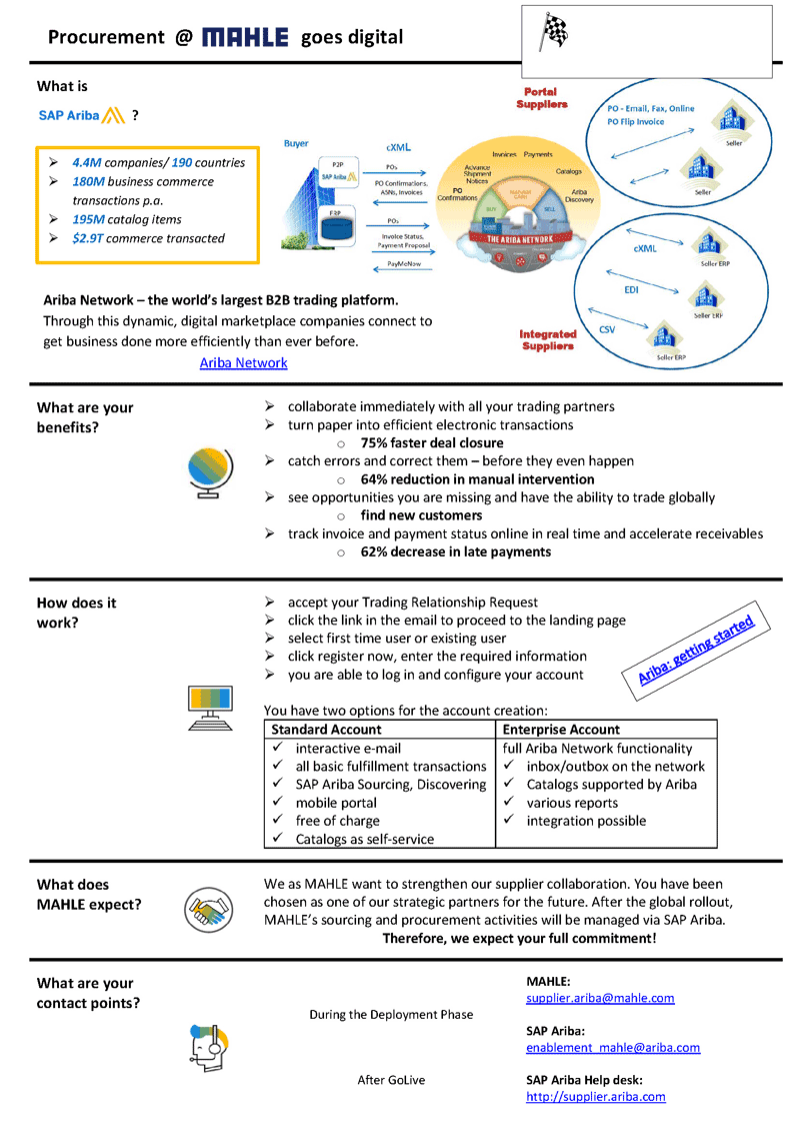
SAP Ariba is the world‘s largest B2B trading network. The digital marketplace enables companies to manage their business relationships and conduct their transactions with maximum efficiency. According to SAP, approximately 4.4 million companies from 190 countries were Ariba network partners in 2019. They have traded approximately 195 million catalog items, completed 180 million transactions, and achieved a trade volume of $2.9 billion (USD).
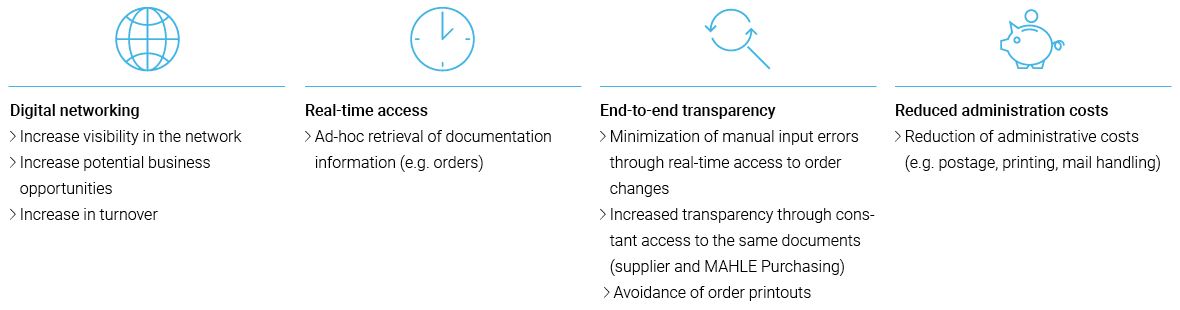
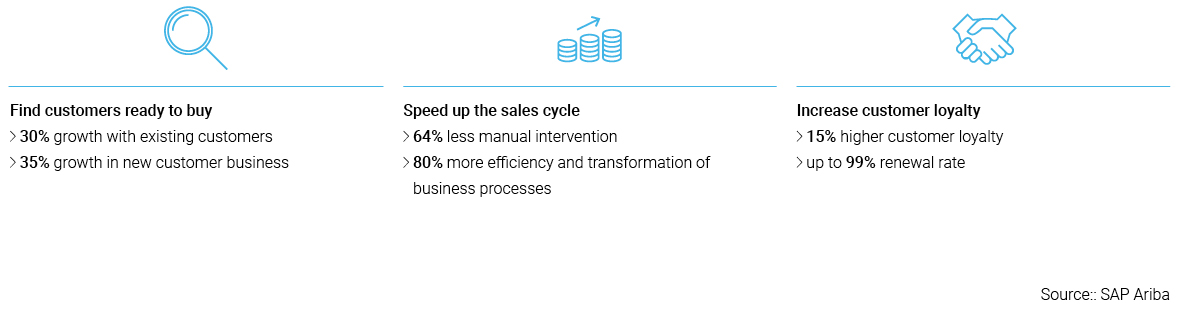
Processing transactions via the SAP Ariba network is of great benefit not only to MAHLE, but also to our suppliers. Your advantages at a glance:
What steps do you have to take to continue your business relationship with MAHLE via SAP Ariba?
In order to successfully continue your supply relationship after the implementation of SAP Ariba at MAHLE, you must be or become a member of the SAP Ariba Network.
Your company is already a member of the SAP Ariba Network?
If you are already a member of the SAP-Ariba Network, you can use your existing account to transact with MAHLE. Please get in touch with your MAHLE NPM-Purchasing contact or fill out the Ariba Contact Form about Ariba. Getting in touch with MAHLE in advance will accelerate the onbaording process significantly and lead to a quick establishment of the trading relationship via Ariba Network.
Your company would like to become a member of the SAP Ariba Network?
What steps do you have to take to continue your business relationship with MAHLE via SAP Ariba?
Which of the accounts you choose is up to you.
A Standard Account is useful for you if your annual number of documents is low. All relevant documents (orders, confirmations, invoices) can be processed via the Standard Account, but it does not offer all network functionalities. For example, orders are only stored on the Ariba Network for a limited time.
If you want to offer MAHLE an e-catalog, you can either choose Standard or Enterprise Account. However an Enterprise Account is recommended as you will receive support from Ariba for setting up and publishing the catalog. This will not be available for Standard Account users, here you have to self-enable the catalog based on training material provided by Ariba. Also, the Enterprise Account is advisable if you exchange many documents with MAHLE and/or other customers and would like to fully benefit from all Ariba Network functions.
The following table shows a comparison of the two account types:
| Section | Standard Account | Enterprise Account |
|---|---|---|
| PO | Order via interactive e-mail (deposit of only one e-mail address possible) | Order via interactive e-mail (deposit of several e-mail addresses possible) |
| PO-Flip of follow-up documents | PO-Flip of follow-up documents | |
| ASN (Advanced Shipping Notice) | ASN (Advanced Shipping Notice) | |
| Machine-to-machine Integration | ||
| In-box Access in the Ariba Network | ||
| SAP Ariba Support | Online Help Center (for technical questions only) | Online Help Center |
| Online Community | Online Community | |
| Offline support via telephone, chat, e-mail | ||
| Direct contact and help from onboarding experts | ||
| Technical support for account configuration and integration | ||
| Online training courses | ||
| Integration | No integration possible | cXML, EDI, Fax, CSV (in future: PDF, e-mail or upload) |
| Reporting | No reporting possible | Reporting is possible |
| E-catalog | Self-enabled e-catalogs possible | Loading of e-catalogs (in BMECat, CIF, cXML, Excel) |
| Fees | Free of charge | SAP Ariba network fees |
| Mobile App | Included (currently usable without restrictions) | Included |
While the SAP Ariba Network Standard Account is free of charge, the following fees apply to the SAP Ariba Network Enterprise Account. However, if your business remains below a certain threshold, also the Enterprise Account does not cause any fees. In general, the fees are set by SAP Ariba and cannot be influenced by MAHLE. Please find there a list with the current Ariba Network fees per region.
Enablement Procedure
Enablement Steps
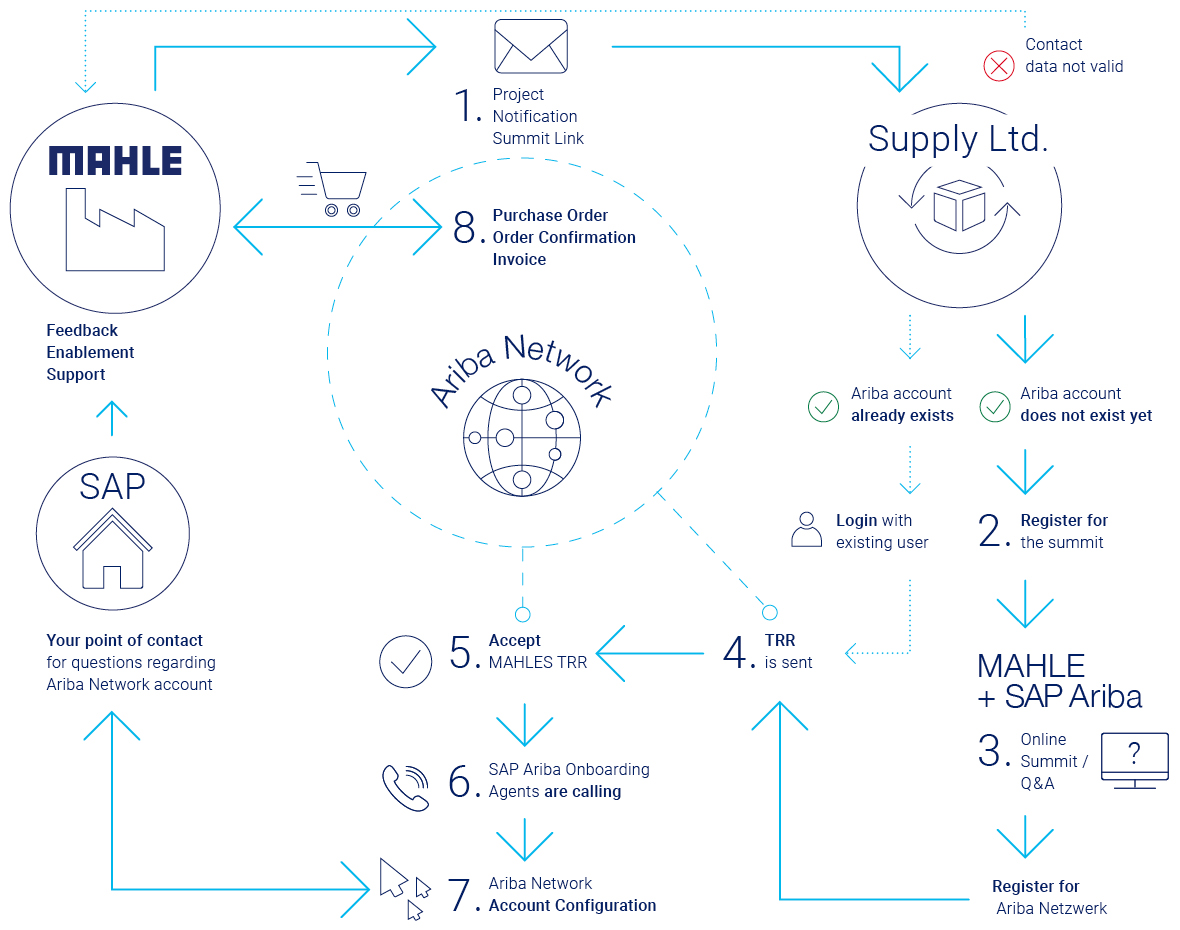
1. MAHLE will send you a project notification letter with the basic project information and an invitation for the supplier online summit. If the chosen contact was not correct, please inform MAHLE to correct the contact data. If you already have an account on the Ariba Network, please use your existing access data to accept MAHLE’s Trading Relationship Request (TRR).
Note: Trading Relationship Request can be also received with Supplier Registration Request (SLP).
2. Please register for the supplier summit in case that you do not have an account on the Ariba Network yet.
3. During the online summit, MAHLE will present more details about the scope and the project. You will have the chance to participate in a live Q&A session with MAHLE and SAP Ariba. Afterwards, you will be asked to register on the Ariba Network if you have not done it yet.
4. MAHLE will send you a Trading Relationship Request (TRR) via the Ariba Network.
5. Please accept it.
6. If you have an enterprise account, the Onboarding Agents of SAP Business Network (old Ariba) will start calling you and support you during the enablement process on the Ariba Network. If you have a standard account, MAHLE Onboarding specialist will support on demand.
7. Please configure your account on the Ariba Network according to the project scope of MAHLE.
If needed, SAP Business Network (old Ariba)/ MAHLE onboarding team will support you in doing so.
8. Once everything is correctly configured, you are enabled for the paperless document exchange with MAHLE (and other customers) on the SAP Business Network (old Ariba) and there with part of global digital supply chains.
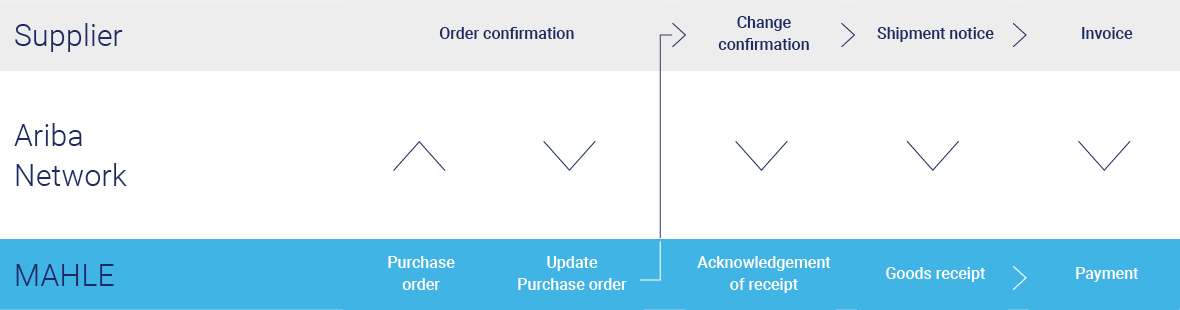
What does the transaction process between your company and MAHLE look like after the switch to SAP Ariba?
In the following, you find the document flow and different onboarding options on Ariba Network. If you would like to have a full integration, please contact us via supplier.ariba@mahle.com.
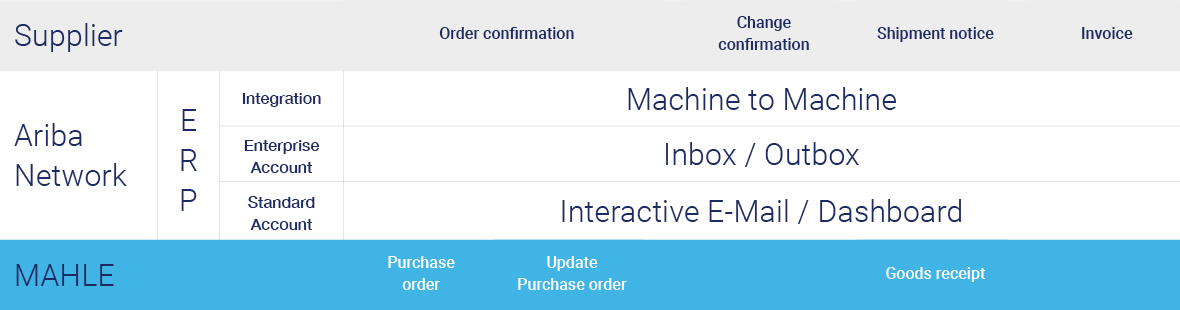
Information on user accounts
Is it possible to create a catalog so that the requester can order our products and services directly?
If you do not yet supply MAHLE via an e-catalog, but would like to do so, then please contact your responsible contact in MAHLE NPM Purchasing or fill in the Ariba Contact Form.
On the subject of data security: Where and how long is my data stored when using SAP Ariba and who has access to it?
- The Ariba Cloud-system, which MAHLE accesses, runs for the most part on servers in Europe.
- The minimum duration of data storage depends on the length of time required by German law and can be read here: Data Privacy at MAHLE.
Can I contact my Purchasing contact person directly if I have further technical questions about SAP Ariba?
Standard (light) account suppliers please contact supplier.ariba@mahle.com.
- Please do not contact your contact person in purchasing.
- Enterprise (full) account suppliers receive telephone support directly from SAP Ariba. For details, see your Trading Relationship Request (TRR).
What types of accounts are available on the ARIBA platform and what are their atributes (e.g. fees, documents, annual turnover, etc.)?
Information about Standard Account can be found here:
Click here : SAP Business Network for Suppliers | Standard Account
Video : Supplier launchpad - Standard account
Information about Enterprise Account can be found here:
Click here : Ariba Enterprise account - Datasheet
Video : Supplier launchpad - Ariba Enterprise account
Information for catalog suppliers
In which format can a catalog be made available?
Catalogs can be provided in, Excel,CIF and BMECat
Which eClass or UNSPSC version should be stored in the catalog?
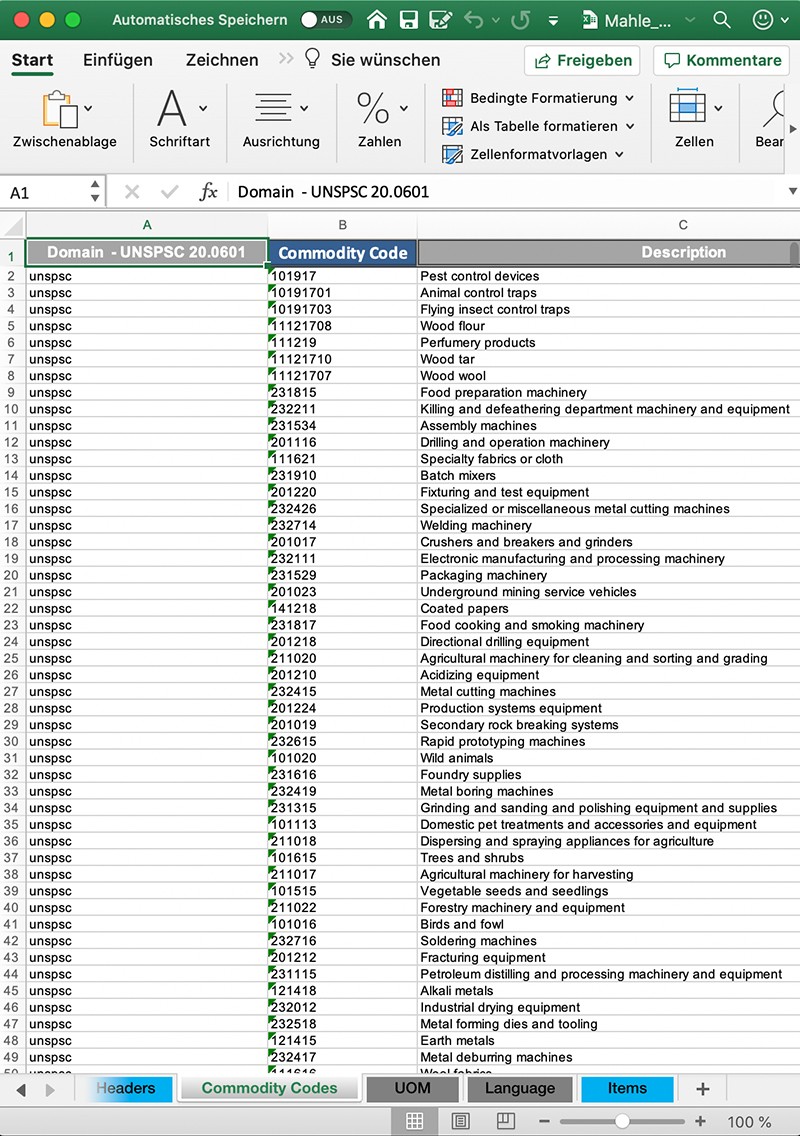
MAHLE has made the decision to use UNSPSC instead of eClass. UNSPSC version 20.0601 has to be used. If you need help for the matching, please contact MAHLE.
What needs to be considered when creating and providing a catalog for MAHLE?
- Please provide unequivocal shortnames that allow the end-user an easy identification of needed goods. Shortnames can contain up to 80 characters in Ariba.
- Catalog items should be equipped with at least one product image. For items where there's no image available, please provide a placeholder image (e.g. your company logo). Pictures should not exceed the maximum size of 250x250 px.
- When uploading the catalog, please use the catalog subscription name provided by SAP Ariba.
- MAHLE is mainly working with static catalogs. If you would like to provide a punch-out catalog (webshop), please address this to your contact in MAHLE NPM Purchasing.
- You can find the catalog template according to MAHLE standards and further helpful documents in our Download Center.
Where to learn more?
- Further in-depth information is available on the SAP Ariba webpage:
SAP Ariba Supplier Training Portal - SAP Ariba and SAP Business Network Tutorials (in multiple languages)
SAP Ariba and SAP Business Network Tutorials | SAP Help Portal
Summit recordings
During supplier summits we share the most important information with you. We work closely with the Ariba team that will guide you through the onboarding process. We urgently ask you to participate in a summit once you are invited. However, if you could not make it, you will find recordings of previous sessions here.
- MAHLE Supplier Summit English (US)
Recording - MAHLE Supplier Summit English
Recording - MAHLE Supplier Summit French
Recording - MAHLE Supplier Summit Spanish
Recording - MAHLE Supplier Summit Slovak/Czech
Recording - MAHLE Supplier Summit Italian
Recording - MAHLE Supplier Summit Thai
Recording - MAHLE Supplier Summit Chinese
Recording
Download Center


You could not find your questions about the SAP Ariba Network? Please contact the following e-mail address: supplier.ariba@mahle.com.